

Preventing Sexual Abuse — What leaders should KNOW
La prevención del abuso sexual: Lo que los líderes deben SABER.
Learn how to protect children from sexual abuse with an effective SAFETY SYSTEM.
Aprenda cómo proteger a los niños del abuso sexual con un SISTEMA DE SEGURIDAD efectivo.
MinistrySafe and KingsCover Insurance Services, LLC are working together to protect children from sexual abuse.
MinistrySafe y KingsCover Insurance Services, LLC están trabajando juntos para proteger a los niños del abuso sexual.
Sign-up to receive your first year's annual MinistrySafe Membership at no cost!
¡Regístrese para recibir su primer año de membresía anual de MinistrySafe sin costo!
Sign-up to receive your first year's annual MinistrySafe Membership at no cost!
¡Regístrese para recibir su primer año de membresía anual de MinistrySafe sin costo!
Child Safety Workshop
Train your staff members and volunteers!
Section 1: Introduction to the Child Safety Workshop
Child Safety Workshop
Train your staff members and volunteers!
Section 1: Introduction to the Child Safety Workshop
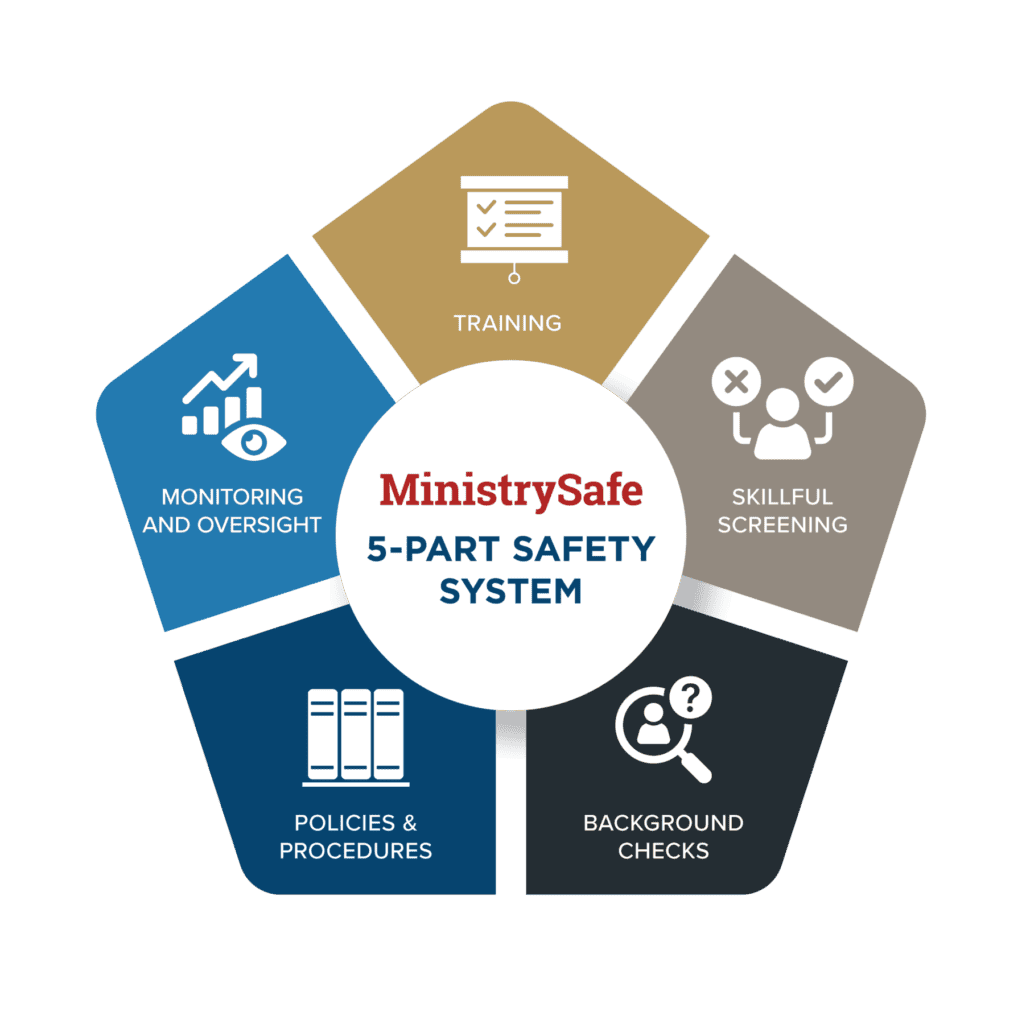
MinistrySafe provides a complete
Child Safety System designed to
reduce the risk of sexual abuse.
MinistrySafe provides a complete Child Safety System designed to reduce the risk of sexual abuse.
Ready to access your Safety System and begin training Staff Members and Volunteers?
Preview MinistrySafe Trainings
Preview MinistrySafe Trainings

Additional Resources
Additional Resources
How to Get Started
Sign Up
Click 'Sign Up', use the coupon code and enter your organization's information.
Follow the instructions to designate a Safety System Administrator (SSA) and create 'Tags' for ease of organizing, filtering and sorting.
Log In and Add Users
Now you are ready to import Trainees. You may enter Trainees individually or have a MinistrySafe staff member import Trainees in batches. The initial batch import will allow you to apply Tags and automatically send Training links to staff members and volunteers. To add additional Trainees, simply log in and click 'Manage Users' on the left-hand menu. Click the green 'Add User' button and enter the appropriate information for each Trainee.
Contact the MinistrySafe office to request batch imports.
Send Training
Click 'Awareness Training', then 'Send Training' on the left-hand menu. From this screen, you may send Training links by checking the box of those you wish to train, then selecting 'Submit'. Choose the Training you want to send and click 'Send'. Trainees will receive an email with a personalized link to view the Training and complete a short quiz.
Contact a MinistrySafe staff member to learn more about the features and functionality of this powerful online resource.
Access the full library of 70+ documents, forms and resources with MinistrySafe Membership.